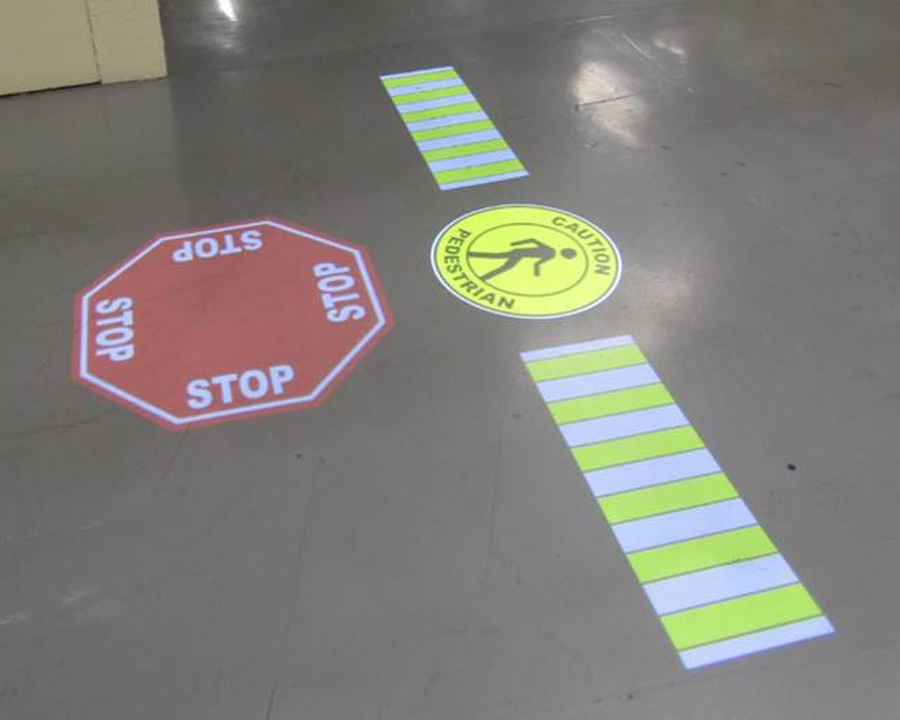
Projected floor marking systems usually avoid the repeated repainting or retaping caused by traffic wear, but they are not maintenance-free. The projected image cannot be scuffed off the floor, yet the equipment still depends on a clean optical path, stable mounting, correct focus, electrical power and suitable ambient conditions. A simple planned inspection program keeps small issues from turning into an unreadable or misplaced safety message.
Maintenance frequency should be based on the environment and the importance of the marking. A clean, stable indoor aisle may need less attention than a dusty loading area or a structure exposed to vibration. The system record should include the approved image position, expected operating schedule and fault-reporting route. For an overview of equipment and applications, see projected light demarcation for industrial sites.
What actually requires maintenance
The main maintenance objects are the projector housing, lens or front glass, gobo slide, bracket, fasteners, electrical supply and any controls. If sensors, timers or equipment interfaces are added, they become part of the inspection scope as well. The floor does not need maintenance for the sake of the projected image, but changes to its coating, cleanliness or reflectivity can affect contrast.
Typical tasks include:
- confirming that the image switches on when expected;
- checking focus, position, rotation and legibility;
- cleaning external optical surfaces using an approved method;
- checking the bracket and visible fasteners for movement or damage;
- looking for cable, connector or enclosure damage;
- verifying sensor or control behavior where fitted;
- comparing the image with the commissioning reference;
- recording defects and corrective action.
Do not open the projector or replace internal parts unless the instructions permit it and the work is performed by a competent person. Maintenance requirements differ by model, enclosure and environment, so the supplied instruction remains the primary equipment reference.
Set inspection intervals by risk and environment
A calendar interval is useful, but condition and consequence should set the priority. A projected logo in a visitor area and a STOP message at a forklift crossing do not carry the same operational risk. Dust, airborne oil, temperature changes, washdown, vibration and frequent door opening may justify shorter intervals.
Create three levels of checking:
- Routine operator observation: report a missing, dim, obstructed or misaligned image during normal work.
- Planned visual inspection: compare position, focus and cleanliness with the accepted reference from a safe viewpoint.
- Technical inspection: isolate power as required, inspect mounting and electrical condition, clean the unit and test controls.
Define the response time for each defect. A minor reduction in sharpness may be scheduled, while a missing warning at a critical conflict point may require immediate fallback controls. The facility’s risk assessment should determine whether the area can continue operating and what temporary signs, barriers or supervision are needed.
Seasonal reviews are useful where sunlight changes significantly. An image accepted in winter should not be assumed to have the same contrast near an open door in summer.
Clean optics without creating new problems
Dust or film on the external optical surface can reduce brightness and clarity. Cleaning sounds simple, but incorrect materials may scratch a lens, damage a coating or compromise an enclosure seal. Follow the equipment instruction for isolation, access, cleaning agent and cloth type. Never spray an unknown chemical directly into openings or clean energized equipment unless the manufacturer’s procedure explicitly allows it.
A safe cleaning plan should address:
- electrical isolation and confirmation of a safe condition;
- cooling time if the unit has been operating;
- approved access equipment and fall protection;
- protection of warehouse traffic below the work area;
- removal of loose dust before wiping;
- inspection of seals and covers after cleaning;
- functional and image checks before handover.
Cleaning the floor may temporarily change appearance through moisture or gloss, so judge the image after the normal floor condition returns. If the image remains weak after cleaning, investigate lighting changes, focus, gobo condition, electrical supply and projector performance rather than repeatedly polishing the lens.
Check alignment, focus and the mounting structure
Small movements at the bracket can create a noticeable shift on the floor, particularly with a high mounting position or an angled throw. Vibration, accidental contact, maintenance work nearby or loose fasteners can all move the image. A marking that drifts away from its approved stop point or boundary may communicate the wrong instruction even if it remains bright.
Use commissioning photographs, measured reference points or discreet fixed landmarks to check location. Inspect from the normal approach direction as well as from the service position. Confirm that text and symbols are not excessively distorted and that no new rack, duct, sign or stored item blocks the beam.
Any adjustment should be controlled. Isolate the area, loosen only the intended adjustment, re-aim and refocus, secure the bracket, and obtain operational acceptance before reopening. If the mounting structure itself is damaged or unsuitable, stop and involve the responsible facilities or structural personnel. Do not compensate for a moving mount by repeatedly re-aiming the projector.
Manage gobo slides, spares and changes
The gobo slide carries the fixed image in many projected sign systems. Keep the approved artwork, orientation and location linked to the equipment record. A spare slide can reduce delay when a message must be restored, but it must match the optical system and the current approved design.
When changing a gobo:
- confirm that the new message has safety and operational approval;
- follow isolation and cooling instructions;
- handle the slide as specified to avoid contamination or damage;
- check orientation before closing the unit;
- refocus and confirm the final image dimensions;
- update drawings, photographs and asset records;
- brief affected personnel if the meaning changes.
Do not treat a gobo swap as merely a graphic update. Changing STOP to SLOW, moving a pedestrian symbol or altering a keep-clear boundary changes the operational control. It may require a revised risk review and employee communication.
For replacement parts, record the projector model and original configuration rather than ordering from appearance alone. Optical compatibility matters, and an unsuitable slide can produce a poor or damaged image.
FAQ
How often should a projected floor marking be inspected?
There is no universal interval. Set it according to the marking’s risk, dust, vibration, access, operating hours and site experience. Combine routine observation with scheduled technical checks.
Does the projected image fade from forklift traffic?
The light image is not physically worn by tires or scrubbers. However, dirt, changed lighting, optical contamination, equipment aging or misalignment can reduce visibility.
Who should clean or adjust the projector?
A competent person following the supplied instruction and site safety procedures. Electrical isolation, work at height and traffic control may be required.
What should happen if a safety projection fails?
Use the fallback defined by the facility’s risk assessment, such as temporary physical signage, barriers, traffic control or taking the area out of service. Record and correct the fault before relying on the projection again.
Build maintenance into the purchase decision
Maintenance planning begins before installation. Choose an accessible but protected mounting location, define who owns the asset, retain commissioning references and decide how a failed marking will be reported. If access requires a lift or production interruption, include that cost and coordination in the lifecycle plan.
The standard package includes remote assessment from photos and dimensions, optical and power calculation, projector, one gobo slide, mounting bracket and standard instruction. Engineering installation plans, sensor or equipment connections, installation, travel and consumables are separately quoted. Review the system-selection and package information, then request a site-based recommendation that accounts for mounting height, image size, ambient light, surface color and texture, and actual operating conditions.