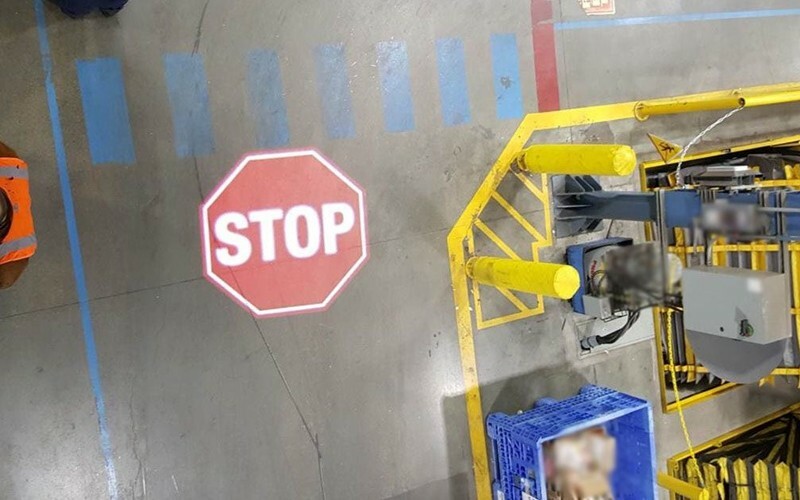
Projected floor marking visibility is determined by contrast at the target, not by projector wattage alone. Ambient light, projection size, mounting distance, angle, floor color and texture, artwork, viewing direction, obstructions and maintenance all influence whether a warehouse user can recognize the message in time. This is why equipment should be selected for a measured or well-documented location.
The application is commonly described in English as projected floor marking, projected safety signage, virtual floor marking or a safety sign projector system. Gobo projector systems form the image with a replaceable slide. Examples and system context are available on the light demarcation overview.
Ambient light and visual contrast
The projected image must remain distinct from the light already falling on the floor. Bright daylight, open loading doors, skylights and concentrated high-bay luminaires can reduce contrast. Low-light photographs can therefore create unrealistic expectations for a daytime warehouse.
- Assess the brightest normal operating condition;
- check changes by shift, season and door position;
- identify direct sun patches and reflections;
- compare the target with adjacent bright surfaces;
- consider measured light levels or an on-site trial for difficult points.
Turning off nearby lights may improve a demonstration but may not be acceptable operationally. The system should be evaluated with the lighting needed for work. Projection can be effective in many indoor industrial settings, but it should not be promised to overpower every daylight condition.
Image size, throw distance and optical output
As the projected image becomes larger, the available light is distributed over a greater area. A projector that produces a strong compact symbol may give a weak result when asked to create a much larger crossing or boundary. Throw distance and lens choice also determine image size and optical efficiency.
Provide the designer with:
- required image width and height or diameter;
- mounting height and horizontal offset;
- approximate projector-to-target distance;
- permitted mounting zone;
- required orientation;
- viewing distance and approach speed.
Do not choose the projector first and enlarge the image until it fills the area. Start with the visual task, then calculate suitable optics and power for the geometry and light conditions.
Mounting angle, distortion and focus
A projector mounted directly above the image can produce more even geometry, but overhead mounting is not always possible. An angled projection may avoid traffic or simplify access, yet it can create keystone distortion and uneven focus. Text and circular symbols may appear stretched from some positions.
- Orient the graphic for the primary viewer, not for a person standing beside it;
- keep critical text and symbols away from heavily distorted edges;
- check focus across the full required area;
- confirm the bracket provides stable fine adjustment;
- avoid angles that allow racks, loads or raised forklift masts to interrupt the beam.
A mock-up based only on a plan view can miss these effects. Photographs from the real approach and accurate vertical dimensions are essential.
Floor color, texture and condition
The floor is part of the optical system. A light, matte, even surface often presents an image differently from dark asphalt, polished epoxy, rough concrete, steel plate or a floor covered with tire marks. Color can also alter the apparent color of the projection.
- Dark surfaces: may require a smaller image or greater optical output.
- Glossy or wet surfaces: can create glare from particular viewing angles.
- Rough surfaces: can break fine lines and small lettering.
- Multi-colored floors: can reduce consistency across a symbol.
- Dust and residue: can reduce contrast even though the light itself does not wear away.
No responsible selection should assume identical performance on every surface. Use current-condition photographs and, where needed, a trial.
Artwork and message design
Visibility is not the same as comprehension. A bright but detailed graphic may be harder to understand than a simple high-contrast symbol. The viewer may be moving, carrying a load or looking through a forklift mast, so recognition time matters.
For practical artwork:
- use short wording and familiar symbols;
- avoid thin strokes and small text;
- provide clear positive and negative space;
- design for the actual approach angle;
- choose colors after considering the floor color;
- keep branding secondary to the safety message;
- approve a dimensioned proof before producing the gobo.
If several audiences approach from different directions, one projected image may not be equally legible to all of them. Separate messages or a different control may be required.
Obstructions, contamination and maintenance
The image can disappear temporarily when an object blocks the optical path or covers the target. Survey normal pallet stacking, parked equipment, raised loads, doors and moving machinery. A symbol placed where goods are routinely staged is not dependable simply because it was clear during commissioning.
Include these checks in routine inspection:
- lens and protective glass cleanliness;
- projector aim, focus and rotation;
- bracket security and vibration movement;
- target cleanliness and new floor damage;
- changes to lighting or racking;
- new obstruction or storage practices;
- continued relevance of the message.
Projected markings avoid tire abrasion of the graphic, but they still require inspection. They are visual controls and do not physically prevent entry into a hazardous area.
How to verify visibility before acceptance
Set an acceptance method before ordering. The most useful check is observation at the installed location under representative conditions, from the intended user approach. Include both the normal and brightest expected lighting state.
- Verify image position and dimensions;
- view the sign from the stated distance and direction;
- check focus, distortion and color against the approved artwork;
- observe with doors, process lights and nearby equipment operating;
- test any schedule, switch or sensor logic;
- record final settings and reference photographs.
Remote assessment from photos and dimensions, optical and power calculation, projector, one gobo slide, mounting bracket and standard instruction form the standard package. Engineering installation planning, controls connection, installation, travel and consumables are separately quoted.
FAQ
Is a higher-wattage projector always more visible? No. Optical design, image size, lens, distance, ambient light and surface all matter; electrical wattage alone does not define target contrast.
Why does the image look weaker near a loading door? Daylight can raise the background brightness significantly, especially when the door opens or direct sun reaches the floor.
Can projection work on a dirty floor? It may remain visible in some conditions, but contamination can reduce contrast or break up detail. Housekeeping and a site-specific assessment still matter.
Should visibility be checked from directly above? No. Check primarily from the position and angle of the person expected to act on the message.
For an optical review of a real location, send photos, dimensions, lighting conditions and the required image size.