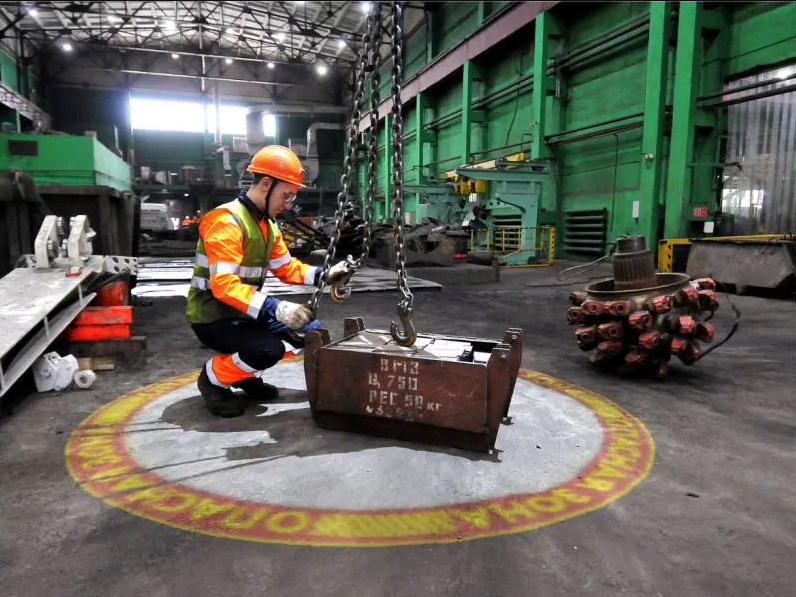
A warehouse site survey for projected safety marking must document the traffic task, ambient light, target surface, mounting geometry, obstructions, power and service access. Good photographs are important, but photographs without dimensions and operating context are not enough. The objective is to give the optical designer a realistic view of where the image will be mounted, how large it must be and what conditions it must compete with.
The survey can support a remote assessment or prepare an on-site trial. It applies to projected floor markings, projected safety signs and gobo projector systems used for STOP symbols, crossings, restricted zones and other warehouse messages. See typical applications on the industrial light demarcation page.
Start with the operational question
Walk the area with the people who use it: operators, pedestrians, supervisors, maintenance staff and the safety team. Ask what decision the marking is expected to support. A projector should not be installed merely because a blank floor area is available.
- Who needs to see the message?
- What are they doing immediately before they reach it?
- From which direction and distance do they approach?
- Is the location a crossing, blind corner, door, dock or work-zone boundary?
- Will parked pallets, vehicles or queues hide the image?
- Is the message permanent, temporary or conditional?
- What existing barriers, signs, paint and procedures already control the area?
Observe more than one operating period when traffic or lighting changes by shift. Informal walking routes and temporary pallet positions may not appear on the official layout.
Photograph the target and its context
Take a repeatable set of images rather than one close-up. Use normal site lighting and avoid exposure settings that make the warehouse appear darker than it is.
- Wide photograph showing the complete intersection or work area;
- view from each intended user approach;
- close view of the target floor surface;
- upward view of the ceiling, beam, wall or column proposed for mounting;
- side view showing the light path between projector and target;
- nearby luminaires, windows, skylights and open doors;
- power points, cable routes and isolation locations;
- obstructions in their normal operating positions.
Place a tape measure, survey staff or known object in selected frames, but record dimensions separately as well. Photograph labels only when they are relevant and safe to share.
Measure mounting geometry and image size
Optical selection depends on geometry. Record vertical mounting height above the target, horizontal offset, approximate throw distance and the available fixing area. If the projector must be angled, identify the intended direction and any limit created by beams, racks or equipment.
Measure or propose:
- target image width, height or diameter;
- distance from the image to the conflict point;
- mounting height above finished floor level;
- horizontal distance from mount to image center;
- clearance around the projector body and bracket;
- distance to heat sources, sprinklers, doors and moving equipment;
- service access route and safe working platform.
Larger is not automatically better. Increasing image size spreads available light over more floor area and may reduce contrast. A very oblique angle can also stretch the image and make text difficult to read from the approach.
Assess ambient light through the working day
Ambient light is one of the most important variables and one of the easiest to misrepresent. Note whether the target receives daylight, direct sun, skylight, light from an open loading door or concentrated illumination from high-bay fixtures. Record the brightest normal condition in which the image is expected to operate.
- Take observations at relevant times, not only during a convenient quiet shift;
- identify lights that switch by zone, occupancy or schedule;
- note seasonal daylight changes near external openings;
- record whether the floor becomes wet or glossy during cleaning;
- use a suitable light measurement method when the location is demanding;
- consider an on-site projection test where contrast remains uncertain.
A camera automatically adjusts exposure, so a photograph alone cannot reliably quantify brightness. Keep original files and avoid heavy editing.
Inspect the floor surface
The target surface affects contrast, sharpness and consistency. Record its base color and condition after normal cleaning - not only after special preparation. A pale matte floor behaves differently from black asphalt, polished epoxy, diamond plate or rough concrete.
- Color and variation across the full image area;
- matte, satin, glossy or wet appearance;
- texture, joints, cracks, drains and level changes;
- dust, oil, rubber marks or process residue;
- frequency and method of cleaning;
- temporary items that occupy the target;
- future resurfacing or layout work.
Projection is not physically abraded by traffic, but dirt can still reduce the visibility of the illuminated graphic. A projected sign does not remove the need for housekeeping or inspection.
Check structure, power and integration
Identify the proposed mounting substrate and ask the responsible site engineer or facilities team whether it may be used. Do not assume that a cable tray, sprinkler pipe, light fitting or cladding panel is a suitable support.
- Material and dimensions of the beam, wall or column;
- access restrictions and approved fixing methods;
- vibration, dust, moisture, temperature and washdown exposure;
- power voltage, outlet or hard-wired supply location;
- isolation, cable containment and electrical responsibility;
- need for a timer, switch, sensor, PLC or equipment signal;
- network or control-panel ownership where integration is proposed.
Engineering installation planning, sensor or equipment connection, installation labor, travel and consumables are separate from the standard equipment package unless quoted.
Turn the survey into a decision record
Compile one survey sheet per marking location. Give every point a unique identifier that matches the plan, photographs and equipment schedule. Record assumptions and unresolved questions rather than hiding them.
A useful handover includes:
- marked plan and location ID;
- photo set with captions and approach directions;
- dimensions and their measurement method;
- proposed artwork and image size;
- lighting and surface observations;
- mounting and power information;
- operating mode and interface needs;
- responsible person for missing data;
- requirement for trial or site verification.
The standard package includes remote assessment from photos and dimensions, optical and power calculation, projector, one gobo slide, mounting bracket and standard instruction. The quality of that remote assessment depends on the quality of the survey data supplied.
FAQ
Can a site survey be completed remotely? Yes, for many straightforward locations, provided the photographs, dimensions and operating conditions are reliable. Complex or very bright locations may need a visit or trial.
Do we need a lux reading? Not in every case, but measured ambient light is useful where daylight, high-output lighting or a large image makes visibility uncertain.
What is the most commonly missed dimension? Horizontal offset is often omitted. Mounting height alone does not define the true projection distance or angle.
Should the survey cover pedestrian and forklift behavior? Yes. The image position and orientation must follow actual approaches, stopping points and obstructions, not only the building geometry.
To begin a remote review, send the marked photos, dimensions and required image size.