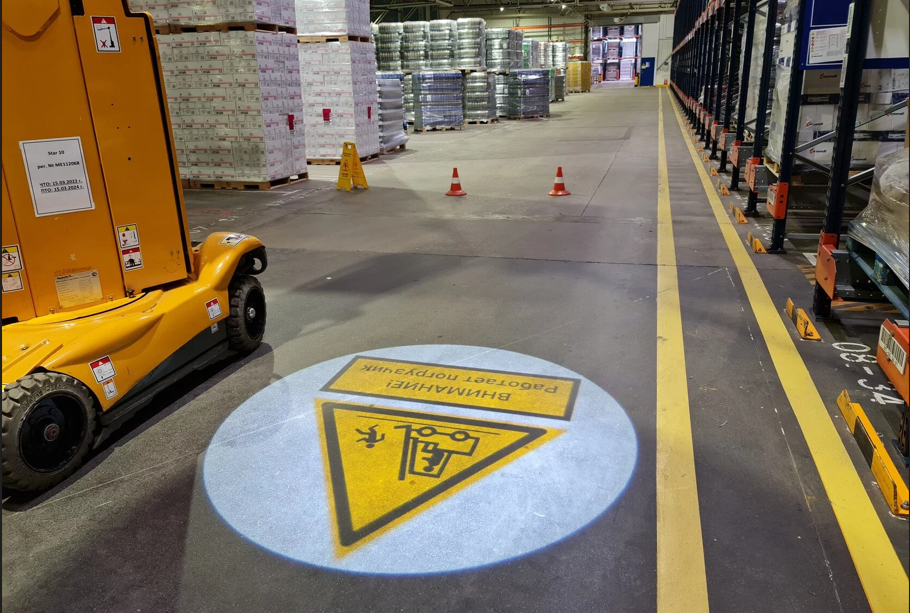
Retail logo projection works best when a defined message is matched to a specific surface, viewing route and lighting period. It can place a static brand mark, direction or campaign graphic at an entrance, on an interior wall or on a suitable floor without applying a permanent printed sign. Results depend on throw distance, image size, ambient light, surface, artwork and mounting position.
Projection is not equally visible throughout every trading day or on every material. Begin with a site brief and compare possible positions rather than choosing a projector from wattage alone. The English logo projector hub is the starting point for matching equipment to a retail installation.
Where Logo Projection Fits in a Retail Environment
A projected logo can support wayfinding, brand recognition, seasonal campaigns or atmosphere. Its advantage is the ability to display a clean static image without attaching a graphic directly to the target surface. That can be useful where wall finishes must remain untouched or where artwork changes periodically. It is not a replacement for every sign: regulatory, emergency and permanent directional information may still require conventional signage.
Define one primary role before selecting a location:
- identify the entrance from a pedestrian approach;
- welcome customers inside the threshold;
- lead visitors toward a department or service point;
- reinforce a campaign near a display;
- create a branded photography area;
- add a repeating motif during selected hours.
A focused objective keeps the image legible. Trying to combine a logo, long message, promotion and directions in one gobo can create detail that disappears at normal viewing distance. Decide who should see the image, from where, and for how long. Then assess whether a static gobo is appropriate or whether frequently changing digital content would better serve the campaign.
Entrances, Floors, Walls and Window Areas
Entrance projection can attract attention after dark or strengthen arrival branding indoors, but exterior spill light, glazing and public routes complicate placement. A beam aimed through or toward glass can reflect unpredictably. Check sightlines from both sides and avoid glare toward staff, customers, traffic or neighbouring premises.
Walls usually offer a controlled target when they are reasonably flat, matte and visually uncluttered. Shelving, signage and moving displays can interrupt the image. Floor projection can be noticeable, but the surface must provide contrast and the mount must avoid directing intense light into people's eyes. Customers, carts and fixtures will temporarily block a floor image, so critical information should not rely on uninterrupted projection.
Window areas require special testing. Daylight and internal reflections can overwhelm the image, while a transparent pane may not act as a projection surface at all. A blind, film or nearby opaque panel may perform differently, but each material needs approval from the property owner and a practical trial. Photograph candidate surfaces during intended operating hours before deciding.
Plan for Store Lighting and Daylight Changes
Ambient light at the target surface is one of the strongest visibility factors. Measure or at least document all relevant conditions: morning sun, overcast daylight, display lighting, track lights, illuminated signs and after-hours security lighting. A projection that looks clear before opening may be washed out when the full lighting scheme is active.
Rather than expecting one setup to dominate every condition, define the useful operating window. An entrance logo may be intended for evening hours, while an interior wall image may run during trading hours if nearby luminaires can be aimed away without harming the retail design. Timers or controls can align operation with the period when the image adds value.
Contrast matters as much as nominal output. Projecting a pale logo onto a similarly colored wall gives weak separation. Glossy tile may create highlights; dark fabric may absorb light; textured brick can break fine lines. Review the brightness and ambient-light guide for a practical visibility assessment. A site test under real lighting is preferable before a permanent installation.
Choose Image Size and Viewing Direction
Set image size from viewing distance and available surface, not from a desire to make the logo as large as possible. A larger projection spreads light over more area and may reduce apparent intensity. It can also extend across joints, doors, shelves or floor transitions. Mark the proposed boundary with removable tape or a temporary template to check scale before equipment selection.
Map the typical customer approach. A logo seen straight on can use different proportions from one viewed at a shallow angle. If the projector must be offset, the image may become trapezoidal and focus may vary from side to side. Repositioning the mount often provides a cleaner result than compensating in artwork.
Record the measured throw distance from the likely lens position to the surface, the desired width or diameter and any obstructions. Ceiling height alone is not the throw distance. The selected lens must produce the required size at the measured position. Leave enough adjustment for accurate framing without letting the image spill onto merchandise or circulation routes.
Coordinate Artwork with the Projection Surface
Retail artwork should be recognizable quickly. Use the approved logo version, preserve required clear space and simplify secondary text that will not remain readable at the target size. Fine registered marks, thin taglines and subtle gradients may need review. A production proof should show crop, orientation and treatment of color or stencil bridges.
Evaluate artwork against a photograph of the actual surface. A dark element may disappear on a dark wall, while a multicolor design can shift visually on a colored background. Surface texture can interrupt small counters in letters. If the floor has strong patterns, a bold single-color symbol may communicate more effectively than a detailed crest.
For source-file and proofing considerations, use the custom gobo artwork guide. Send the best available vector or high-quality raster source, but do not assume a specific file format will be accepted until the production team confirms it. Keep campaign naming and version approval in writing to prevent an outdated logo reaching the fixture.
Plan Mounting, Operating Hours and Customer Safety
The mount must attach to a verified structure using hardware and orientation approved for the projector. Coordinate with the landlord, store designer, electrical contractor and fire or safety teams where required. Maintain ventilation clearances and service access. A projector above customers or merchandise needs appropriate attachment, secondary restraint if specified and controlled access during maintenance.
Route power and control cables away from doors, moving displays, sprinklers, heat sources and customer contact. Temporary leads across a sales floor are not a suitable permanent solution. Program operating hours to match the campaign and manufacturer guidance, while allowing shutdown and cooling procedures to work correctly.
Review the complete beam path. The projection should not create distracting glare at eye level, interfere with cameras or sensors, or invite customers into unsafe positions for photographs. Floor images will be crossed and blocked; wall images may be covered by new merchandising. Include the projector in display-change checklists so later teams do not place combustible decor against it or obstruct airflow.
Prepare a Retail Brief and Request a Quote
Send photos of the proposed mounting point, target surface and customer approach, together with measured throw distance, desired image size, lighting schedule, artwork and operating hours. State whether any part is outdoors or behind glazing and identify installation, landlord or access constraints. A practical proposal should match projector, lens, gobo and mounting to this information.
FAQ
Will a storefront logo remain visible in direct daylight? It should not be assumed. Direct and reflected daylight can overwhelm projection. Test the exact surface and define realistic operating hours, often focusing on lower-light periods.
Can a logo be projected through a shop window? Clear glass is not automatically a suitable screen and can create reflections. The full arrangement requires a site test and consideration of glare and viewing direction.
Is floor projection safe around customers? It can be planned safely, but mounting, beam direction, cables, glare, trip risks and crowd behaviour must be assessed. It should not carry essential safety information.
How large should a retail logo be? Size depends on viewing distance, available area, lens, throw distance, ambient light and surface. Larger is not always clearer because light is spread over more area.
Share the store brief and request a retail logo projection quote.